Updated 2026-11-26 · Early Access ($39.99 USD) · Week 1 Patch Live
Fixing Stuck on “Connecting...” & “Match Found” Freezes (Community Workarounds)
If Motocross The Game gets stuck on the Connecting... screen at startup or freezes on MATCH FOUND, first make sure Steam has downloaded the November 21, 2026 Early Access Week 1 Patch—Virtual MX Studios shipped dedicated connection fixes alongside more detailed error codes to pinpoint connection failures faster, fixed the post-race Ready bug that previously required restarting the game, and fixed menu inputs failing on certain devices. If Connecting... still loops after patching, separate three scenarios before touching local files: (1) everyone is stuck = temporary backend outage; (2) fails only with a VPN active = VPN routing block; (3) only your PC is stuck after servers recover = stale local DNS cache (ipconfig /flushdns), auth state, or incomplete install files. Note also that the Week 1 Patch placed the backend in temporary degraded mode (some casual games start in P2P, and other players' Practice ghosts were paused—on Nov 26, 2026 Virtual MX Studios announced that leaderboards will be back within a few hours).
- Verify Integrity of Game Files in Steam First: Players on r/MotocrossTheGame and Steam Discussions report that running Steam → Properties → Installed Files → Verify integrity of game files clears stalled
Connecting...andMATCH FOUNDloops after updates. If local files insteamapps\common\Motocross The Gameremain incomplete (Steam thread), run a clean uninstall and reinstall. - Flush Windows DNS Cache & Disable Any VPN: Server infrastructure changes leave stale local DNS records (Steam Discussions). Open Command Prompt as Administrator, run
ipconfig /flushdns, and disconnect any VPN that blocks the handshake. - Check Backend Outages (Always-Online Client): Early Access requires a live server connection at startup even for solo riding (no offline mode yet). If everyone is stuck, check the
MTG Updateschannel in the Official MTG Discord. - Work Around “MATCH FOUND” Queue Freezes: If public matchmaking hangs (Steam report), check Task Manager, relaunch, and join a regional private lobby via party invite code (Tracks & Modes) or run solo Practice.
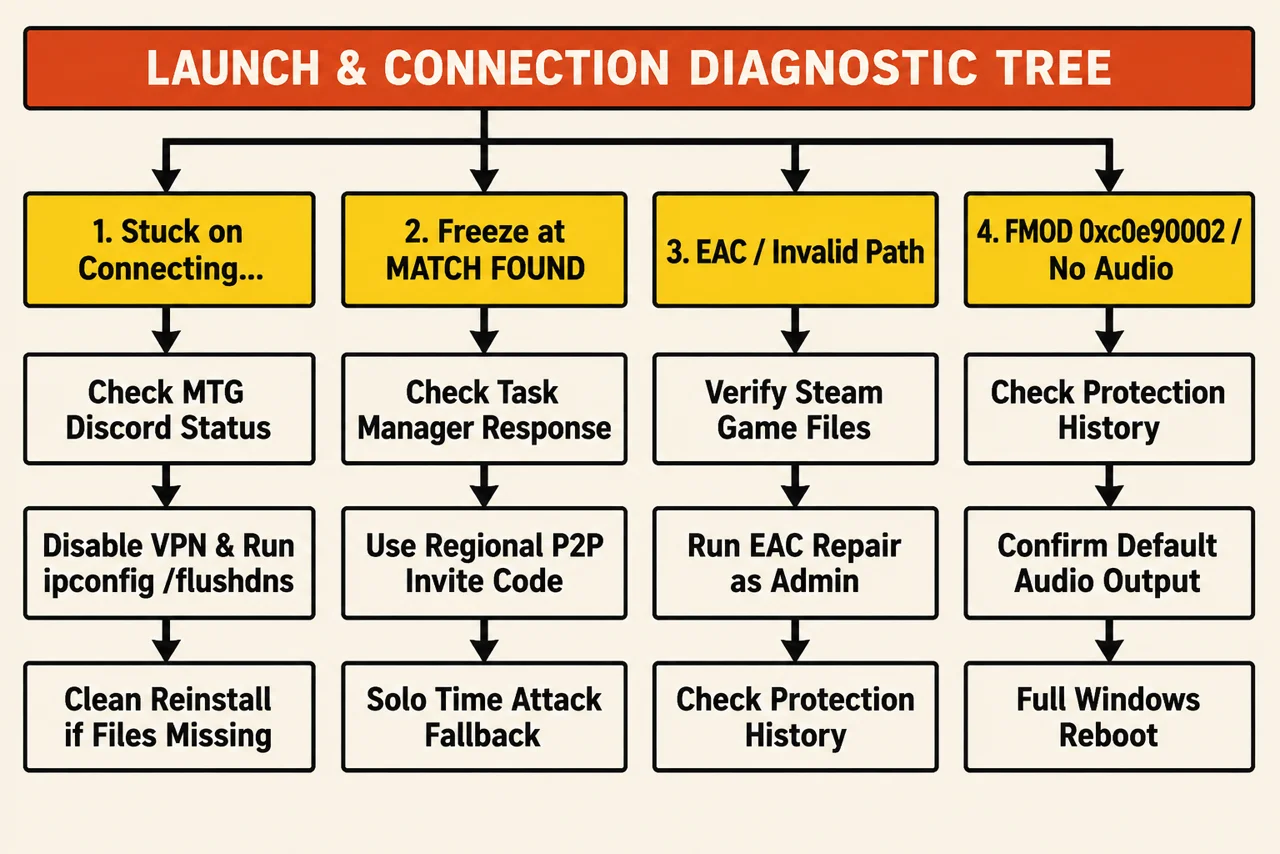
Quick 4-Check Triage: (1) Are all players stuck on Connecting...? Check Official MTG Discord for a backend outage or degraded-mode announcement. (2) Does it fail only with a VPN active? Disconnect the VPN. (3) Patched to Nov 21 Week 1 Patch & checked Steam file integrity? Update and inspect the new detailed error code. (4) Isolated to audio, EAC, or matchmaking? Jump directly to the matching branch below.
Step-by-Step: Fixing Easy Anti-Cheat & Startup Launch Errors
Across Steam App ID 3188660 Discussions, launch-week reports center on Easy Anti-Cheat (EAC) startup errors (including players seeing Windows 11 Smart App Control prompts), incomplete file verification, and missing engine audio—while Steam's store page explicitly discloses kernel-level Easy Anti-Cheat and Xbox-only controller metadata. Separate official Steam troubleshooting steps from community-reported workarounds below:
- Verify Integrity of Game Files in Steam: Right-click Motocross The Game in Steam → Properties → Installed Files → Verify integrity of game files so corrupted or missing EAC bootstrap files re-download cleanly.
- Run the Easy Anti-Cheat Setup Installer as Administrator: Browse to the game's install directory via Manage → Browse local files, run the EAC installer/repair executable as administrator, and ensure no leftover third-party injectors or `.pak` mods remain in the folder.
- Check Windows Security Protection History & Smart App Control (
Invalid game executable path!): If EAC halts at launch on Windows 11 withInvalid game executable path! (...MotocrossTheGameSteam-Win64-Shipping.exe), check Windows Security → Protection history and allow the Steam game executable and Easy Anti-Cheat service through Microsoft Defender Firewall. In the pinned Steam Discussions Launch Error thread, Virtual MX Studios marked the official developer answer: “Please disable Windows Smart App Control” (Windows 11 Smart App Control has no per-app exemptions and cannot be turned back on without a Windows reset/reinstall, so verify Steam files and Protection History first before disabling it). - Complete MTG Account Linking Before Online Entry: Steam requires a linked MTG Account (
motocrossthegame.com); authorize Steam linking in your browser once so online authentication completes cleanly (see MTG Account & Key Setup). - Reboot Windows After Driver, EAC, or Audio Resets: Players hitting the silent bike-engine audio bug or hung EAC kernel drivers report a full PC restart restores normal audio and service initialization immediately.
Fixing Missing Bike Audio, DualSense Input & Resolution Quirks
- No Bike Noise / FMOD Error
0xc0e90002(Community-Reported Workarounds): Before rebooting, check Windows basics first: confirm other apps/games play sound, open Windows Volume Mixer (Win + Gor Settings → System → Sound → Volume mixer) to verify Motocross The Game is not muted or routed to a disconnected Bluetooth/monitor device, and update audio drivers. Several players in Steam Discussions also report a Windows error (0xc0e90002) pointing directly toMotocrossTheGame\Plugins\FMODStudio\Binaries\Win64\crankcaseaudio_rev_fmod_studio_dll64.dllwhen Windows Security or Windows 11 Smart App Control blocks the audio plugin (audio threads and Smart App Control thread). Check Windows Security → Protection history to review whethercrankcaseaudio_rev_fmod_studio_dll64.dll(or the game executable, which can also triggerInvalid Game executable path) was blocked, verify game files in Steam, perform a full Windows restart (Restart, not Sleep), and report unsigned binary blocks in the Official MTG Discord rather than disabling OS protections globally or downloading replacement DLL files from third-party sites. - How to Separate Launch Failure Causes & Account Auth Loops: Check the exact symptom before changing system settings: (1) an Easy Anti-Cheat popup/code points to corrupted game files or EAC service permissions (fix via Steam Verify integrity of game files and EAC repair); (2) stalling on the sign-in / browser prompt—even if browser auth already succeeded—can happen when Steam account linking did not persist cleanly or a session cookie expired; sign out of
motocrossthegame.com, verify your Steam ID link inside your MTG profile, clear stale browser session cookies if needed, and relaunch from Steam; and (3) booting cleanly with no engine sound points to Windows audio output routing or a first-launch driver initialization issue. - PS5 DualSense / PS4 Controller Not Responding (
Steam Metadata Workaround): Steam App3188660metadata listsPartial Xbox Controller Supportwith native PlayStation flags disabled. Enable Steam Input (Steam → Properties → Controller → Enable Steam Input) to map DualSense inputs to XInput without stacking extra Steam deadzones. - PC Freezes or Crashes With AMD FSR Enabled (
Official Week 1 Patch Advisory): Both community reports on r/MotocrossTheGame and Virtual MX Studios' November 21, 2026 Week 1 Patch notes note that some crashes appear to be caused by FSR being enabled. The studio officially recommends disabling AMD FSR for the moment (players suggest NVIDIA DLSS or standard non-FSR anti-aliasing as a workaround). - Off-Track Soft-Lock Spots (
Steam Discussions): If your bike slips into an out-of-bounds pocket where the rider loops or keeps falling (Steam soft-lock thread), use Return to Pit from the pause menu to reset cleanly to the track. - Display Resolution & UE5.7 Frame Pacing (Nov 21 Patch Note): Update 47's Week 1 Patch explicitly warns players to disable AMD FSR to avoid crashes while temporary degraded server mode (
P2P fallbackwith detailed connection error codes; Practice ghosts & leaderboards temporarily paused) remains active. On1440p/ultrawide monitors, give solo Practice one lap to settle shaders, switch to NVIDIA DLSS or native scaling instead of FSR, and drop foliage/shadow quality first as covered in PC Performance & Specs Optimization.
EA Launch Rollout Context & Manual Easy Anti-Cheat Uninstall
Launch day saw heavy queue traffic after Valve cleared Update 47, alongside early P2P lobby hiccups. Note Steam's security disclosure: Easy Anti-Cheat requires manual removal after you uninstall Motocross The Game—removing the game from Steam leaves the kernel EAC driver behind until you run its uninstaller.
Sources
- Steam App ID 3188660 — System Requirements & Easy Anti-Cheat Disclosure
- Steam News — Early Access Week 1 Patch (Nov 21, 2026: Connection Codes, Ready/Input Fixes & FSR Crash Advisory)
- Steam Discussions — People who can't load: CONNECTING... (DNS Flush & VPN Fix)
- Steam Discussions — Not Connecting & Clean Reinstall Thread
- Steam Discussions — Can't Connect to Server at Launch / Server Outage
- Steam Discussions — Online Connection Only / No Offline Mode
- Steam Discussions — MATCH FOUND / OS Freeze Thread
- Steam Discussions — Online Casual Match Found Freeze
- Steam Discussions — Launch Error / Invalid Game Executable Path (Pinned Virtual MX Studios Answer)
- Steam Discussions — Easy Anti-Cheat Launch Error Thread
- Steam Discussions — Invalid Game Executable Path / Smart App Control
- Steam Discussions — FMOD Sound Error 0xc0e90002 (crankcaseaudio_rev_fmod_studio_dll64.dll)
- Steam Discussions — No Bike Noise Audio Fix Thread
- Steam Discussions — Bike Audio Gone / Smart App Control Fix
- Steam Discussions — Off-Track Soft Lock Report
- r/MotocrossTheGame — 2-Minute Freeze / FSR Anti-Aliasing Workaround
- Slick Dozer — Change THESE Settings in Motocross The Game to STOP CRASHING! (YouTube)
- Kelso — Motocross The Game's LAUNCH Was CHAOS... (YouTube)
Next: optimize framerates in PC Performance & DLSS/FSR or set controller curves in Controller Deadzone & Setup.