Updated 2026-11-26 · Early Access ($39.99 USD)
Why Default Controller Settings Feel Twitchy in Early Access
Unlike single-body arcade racers, Motocross The Game (Steam App ID 3188660) runs Rider Physics V5, calculating handlebar steering, chassis lean, and 4-way rider mass transfer independently. On default 100% linear curves with near-zero deadzones, tiny thumb tremors cause headshake down fast Estrella MX straights and instant front-wheel tuck on Rödeby CK clay. Dialing Deadzone, Linearity, and Gain fixes all three issues immediately.
Official Beginner Preset, Patch Settings Reset & Manual Calibration
- Official Week 1 Patch Beginner Preset (
In-Game Signed Slider Scale): Added on the launch splash screen in the November 21, 2026 Week 1 Patch, this preset turns on all riding aids, sets Gain-4, Sensitivity-5, Linearity-1, and Deadzone10, adds an MTG Explained button in the Home and Practice Pit menus, fixes menu inputs for affected hardware, and refines WIP head look-at. Because Virtual MX Studios uses its own in-game preset slider scale (-5/-4/-1/10), do not treat those numbers as a mathematical 1:1 conversion of the community percentages below. - Post-Patch Settings Reset & Backup Tip (
Steam Discussions): One rider updating to the November 21 Week 1 Patch reported in Steam Discussions that the update reset their saved settings (while another community member advised keeping backups, and an earlier keybind glitch report noted swapped Sit/Stand inputs clearing after a manual binding reset). Take screenshots (F12plus a local folder backup) of both your controller sliders and custom keybindings before installing Early Access patches, and verify them in Practice before joining a race. - Manual Competitive Axis Calibration (
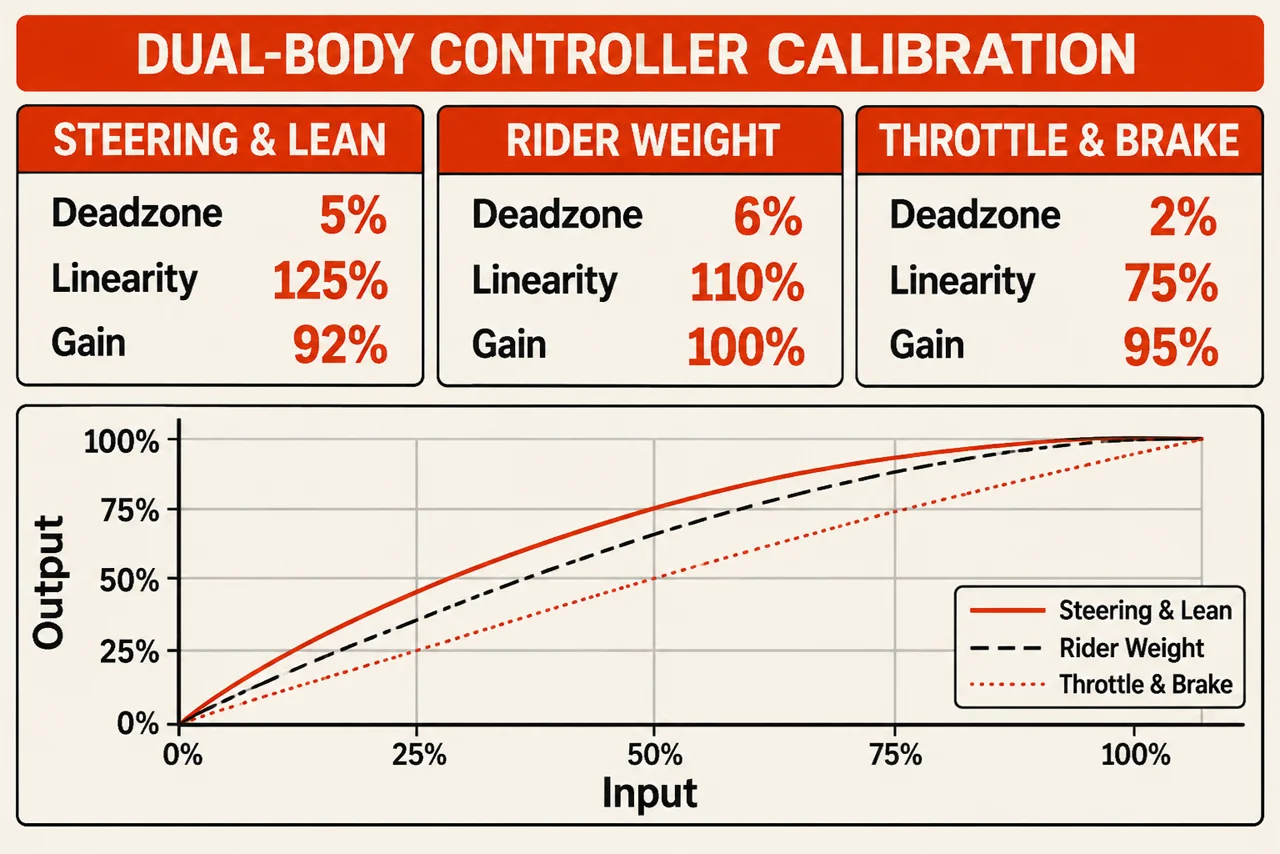
Community-Tested Starting Baseline): Riders stepping down from full assists tune individual sticks and triggers (Deadzone 5% / Linearity 125% / Gain 92%on Left Stick,6% / 110% / 100%on Right Stick,2% / 75%on triggers). Before raising Deadzone, sit stationary on the starting gate in Practice with thumbs off the sticks: if the bars jitter slightly, confirm stick drift in Windowsjoy.cplor Steam Controller calibration before bumping Deadzone from3%–5%to8%–10%. To return to factory defaults at any time, reset the in-game input tab and keep Steam Controller Layout on default/disabled unless mapping PlayStation pads or custom axis inversions.
Switching & Inverting Lean (L/R vs. F/B Axis)
Players transitioning from MX Bikes or other motocross simulators often ask how to flip rider lean directions:
- Invert Left/Right (
L/R) Lean (In-Game Menu): Open the first tab of the in-game Settings menu to toggle Left/Right lean direction (Standardvs.Inverted) if your counter-steering muscle memory expects opposite lateral input. - Invert Forward/Backward (
F/B) Lean (Steam Input Workaround — Right Stick Only): As raised in Steam Discussions ("Switching Lean"), Motocross The Game does not currently include a native in-game toggle to invert Forward/Backward (F/B) rider weight. This workaround flips only the Right Stick vertical rider-weight axis (leaving ThrottleRTand Front BrakeLTuntouched):- Step 1 — Enable Steam Input: Right-click Motocross The Game in Steam → Properties → Controller → set Override to Enable Steam Input.
- Step 2 — Invert Right Joystick Vertical Axis: Open Edit Layout → Joysticks, select the gear icon next to your Right Joystick (rider weight), and toggle Invert Vertical Axis.
- Step 3 — Directional Practice Test: Sit on the gate or roll slowly in solo Practice and pull the Right Stick down—with default uninverted mapping the rider leans back (helping wheelies/rear berm traction), whereas with Vertical Invert active pulling down shifts rider mass forward over the bars (and pushing up leans back). Revert the toggle if it feels backwards.
How Deadzone, Linearity & Gain Interact
- Deadzone (
Center Noise Filter): Sets how far a stick or trigger travels before registering input. Set Left-Stick Deadzone to5%default (3%–5%on zero-drift Hall-effect sticks,8%–10%on worn Xbox/DualSense sticks) until your handlebars rest completely motionless on the starting gate. Keep trigger inner deadzones tight at2%default (2%–5%range) for immediate brake/throttle pickup. - Linearity (
Center vs. Edge Response Curve):100%is a straight1:1line. Raising Steering Linearity to120%–130%(or lowering trigger linearity to75%depending on curve direction in-menu—verify on the input bar graph so the first half of your pull produces gentle output) gives fine feathering precision around center without sacrificing full-lock authority. - Gain (
Maximum Output Ceiling): Dropping Steering Gain to90%–92%and Front-Brake Gain to95%shaves off the harsh top5%–8%spike when you slam the stick in panic, preventing violent rut high-sides and front-wheel washouts. - Layer 1 (In-Game Calibration) vs. Layer 2 (Steam Controller Layout — Do Not Stack Both): Players experiencing abrupt full-lock twitch, flickering control-bind menus, or perceived clutch delay (Steam Discussions handling & binding threads) should adjust one layer at a time so inputs do not over-dampen:
- In-Game Calibration & Rear ABS Progression (
Default Method): Tune deadzone, linearity, and gain directly inside the game's input menu (Deadzone 5% / Linearity 125% / Gain 92%are community-tested starting points), set Sit/Stand toHold(instead of Toggle), and start with Front ABS OFF / Rear ABS ON as shared in the r/MotocrossTheGame Tips & Best Settings Megathread. Once comfortable, consider testing Rear ABS OFF with independent Front (LT) and Rear (RB) brakes (avoiding Steam Input combined-braking binds)—as Kelso demonstrated in his 125-hour settings update, removing combined brakes and Rear ABS requires relearning braking habits but lets you carry higher corner speed. To restore defaults, reset the in-game input tab and leave Steam Controller Layout unmodified.
- In-Game Calibration & Rear ABS Progression (
Steam Controller Layout “EZ Mode” (49% Clamp), Flickering Bind Screen & Input Delay Workarounds
Steam Controller Layout “EZ Mode” Clamp (49% H/V vs. 10% + Relaxed Alternatives): If slow-turn flopping persists, open Steam's controller icon (Edit Layout → Joysticks → Left Joystick Gear) and test 75% sensitivity or the original community “EZ Mode” 49% Horizontal / 49% Vertical clamp (Steam Discussions, acknowledged by Virtual MX Studios on Nov 21). Keep two distinct community posts separate: (a) Original EZ Mode: 49% Horizontal / 49% Vertical clamp (the poster reported 50% still caused crashes on their setup while 49% stopped slow-turn flopping at the cost of slower full-lock turn speed, and also recommended binding clutch to gear shifts like MX Bikes); (b) Alternative Reply Tuning: another commenter ran 10% tuning paired with Steam's Relaxed joystick response curve. Change one layer at a time—leave Steam's extra deadzone at 0% and keep in-game Gain near 100% when using a Steam clamp, and to undo EZ Mode later, reset Steam's Left Joystick Horizontal/Vertical sliders back to 100% (and response curve to Linear).
Flickering Bind Screen, V-Sync OFF & Input Delay: If the bind UI flickers when remapping Clutch or axes (binding trouble thread), unplug secondary USB flight/sim pedals or vJoy devices, toggle Steam Input once, and bind one axis at a time. If you notice heavy input lag (Steam Discussions), turn V-Sync OFF, avoid restrictive low FPS caps, and check UE5.7 frame pacing in PC Performance & Specs so display lag is not mistaken for dual-body inertia.
Recommended Dual-Body Controller & Anti-Misshift Button Layout
Many Early Access players accidentally click L3/R3 while bracing thumbs during triple scrubs, triggering unwanted gear shifts mid-air. Separate your chassis and rider channels cleanly:
| Function | Recommended Gamepad Binding | Keyboard Fallback (Enable Assists) |
|---|---|---|
| Chassis Steering / Lean | Left Stick Horizontal | A / D (keep Weight Assist ON) |
| Rider Weight (Fwd/Back & Left/Right) | Right Stick 4-Way Axis | Arrow Keys (Up / Down / Left / Right) |
| Throttle & Front Brake | RT / R2 (Throttle) · LT / L2 (Front Brake) |
W / Space (keep Throttle Assist ON) |
| Clutch & Rear Brake | LB / L1 (Clutch) · RB / R1 (Rear Brake) |
Left Shift (Clutch) · Ctrl (Rear Brake) |
| Shift Up / Shift Down (Anti-Misshift) | B / Circle (Shift Up) · X / Square (Shift Down) — unbind L3/R3 |
E / Q (or Auto-Shift Assist) |
| Sit / Stand & Seated Bike Walk | A / Cross or R3 (set Sit/Stand to Hold) · D-Pad / Walk Bind |
Keyboard C (Sit/Stand) · Check in-game Controls menu for walk bind |
| Camera View Toggle & Practice Respawn Marker | D-Pad Up (1st/3rd view) · Hold Respawn (5–6s) sets marker | Check in-game Controls menu (no official default keyboard map published) |
Keyboard-Only Setup & Limitations (Why Analog Gamepad Is Recommended)
Steam lists Gamepad Recommended (Partial Xbox Controller Support, keyboard supported) because binary keyboard keys (A/D steering and W throttle) apply 0% or 100% input instantly rather than progressive analog modulation. Virtual MX Studios has not published a full official keyboard-only keymap outside the game, so open the in-game Controls menu to inspect or rebind low-speed walking, camera toggle, and Respawn before leaving the gate, keep Weight, Throttle, and Clutch Rider Assists enabled, and avoid rapid A/D tapping over jump lips; remap Shift Up/Down and Sit/Stand (C) away from modifier keys that trigger Windows Sticky Keys.
Step-by-Step Controller Calibration Checklist
- Enable Steam Input Only for PlayStation Pads: Xbox pads work natively on Windows. For DualSense / DualShock 4 pads, open Steam Library → Properties → Controller → Enable Steam Input, and leave Steam's own extra deadzone at `0%` so double deadzones do not stack.
- Zero Out Gate Drift First: Load solo Practice on Estrella MX, take thumbs off the controller, and raise Steering Deadzone in `1%` steps (`3%` → `5%`) until handlebar twitch disappears.
- Set Steering Linearity (`125%`) & Gain (`92%`): Test sweeping flat turns on Rödeby CK; if the bike snaps inward too fast at full stick, lower Gain from `92%` to `90%`.
- Soften Throttle & Front Brake (`75%` Linearity): Test a 2nd-gear hard-clay exit on the 450F; `75%` trigger linearity lets you feed half-throttle smoothly without spinning sideways.
- Step Down Rider Assists Gradually: Start with Weight, Throttle & Clutch Assists ON, then disable Throttle first, Clutch second, and Weight Transfer last as detailed in our Beginner Rider Assists Guide.
Optional PS5 DualSense Adaptive Triggers (DSX App) & Shift+Clutch Bind
PS5 DualSense Adaptive Triggers (Via DSX, Non-Native): As shown by Kelso on Nov 25, 2026, PC DualSense / DualSense Edge players can simulate front-brake resistance and progressive throttle tension using DSX on Steam ($7.99 USD) running in the background. Xbox and PS4 pads lack adaptive trigger hardware, and DSX presets do not dynamically read in-game physics or traction telemetry.
Combine Shift + Clutch: There is no native single toggle to auto-clutch on shift; add an Extra Command (LB Clutch) to Shift Up/Down in Steam Input if desired (see Throttle & Clutch Guide).
Sources
- Motocross The Game on Steam — Controller & Input Metadata (App ID 3188660)
- Steam News — Early Access Week 1 Patch (Nov 21, 2026: Official Beginner Preset & Device Input Fixes)
- Motocross The Game Official — MTG Explained: Controls and Controller Setup_01 (YouTube)
- August & September 2026 Steam News — Low-Speed Walking & Rider Physics V5
- Steam Discussions — Controller Handling & Sensitivity PSA
- Steam Discussions — Input Delay & Deadzone Discussion
- Steam Discussions — EZ Mode 49% Steam Layout Clamp (Nov 18–21, 2026)
- Steam Discussions — Switching Lean (L/R vs. F/B Invert Request)
- Steam Discussions — Post-Patch Settings Reset & Screenshot Backup Tip
- Steam Discussions — Sit/Stand Keybind Glitch Reset
- Steam Discussions — Camera View Toggle (D-Pad Up) & Respawn Marker Hold
- r/MotocrossTheGame — Tips & Tricks Best Settings Megathread
- Kelso — My BEST Settings After 70 HOURS in Motocross The Game! (YouTube)
- Kelso — I Changed ONE Setting After 125 HOURS in Motocross The Game... (Rear ABS OFF & Separate Brakes)
- Kelso — I Added Adaptive Triggers to Motocross The Game… (DualSense + DSX, Nov 25, 2026)
- Steam Discussions — Combining Shift & Clutch / Auto-Shift Thread
Next: pair your controller curves with Workshop Tuning: Gearing, Clicks & PSI or Camera FOV & Replay Setup.